
 RSS Feed (xml)
First, we had a very simple, daily quiz on homework tasks previously assigned and the information covered in the blog. He showed us the correct way to post for points as well as how to make a scribe post. Also, we went over different ways to convert units using the metric system. Jojo showed us a brief explanation and a pictural representation of the relative unit sizes in relation to each other. We have also learned that the units from largest to smallest in the metric system are as follows: Kilometer, Meter, Centi, then Mili. 10 Milimeters make up one centimeter, 100 centimeters make up a meter, and 1000 meters make one Kilometer. Along the same lines, it takes 1000 milimeters to have 1 meter.
Furthermore, we have learned to convert from one unit system to the other using conversion factors such as 1in = 2.54cm. We also learned that when solving simple algebraic equations with all of the variables having the same units, the units then cancel out. We now know how units act.
Although we have other valuable resources such as a calculater or google, we must learn how to convert from one system of units to the other. One easy way to evaluate unit conversions is to be cognisant of the similarities between variables such as one apple = one apple, one orange = one orange and one foot = 12 inches. Using this system, we can properly covert units from one system to the other by properly crossing out the the waste variables and keeping the variables we need. For example, if you need to end up with an answer with the units of miles/hour and you start out with feet/second, you will have to multiply the feet/second by 3600seconds/1hour. That conversion will convert your feet/second into feet/hour. You then multiply your feet/hour by 1 mile/5280 feed and this will take care of your conversion from feet to miles. You end up with miles/hour after canceling out the seconds first and then the feet.
In order to notate an approximate answer, the symbol called the tilde (~), is used.
Length can be described without units if describing sections of length from one point to another. For example, AB = 5, BC = 10, so AB + BC = AC. Part of the line added to the remaining part's length, will equal the total length from A to C.
The next scribe is Cullen.
Monday, August 31, 2009

How to write equations on PBWorks!
In order to write out a mathematical expression online you will have to follow a couple of steps.
Using the equation editor on the front page of PBWorks, construct your expression.
For example if you want to create a fraction press the fraction button. First button, top left.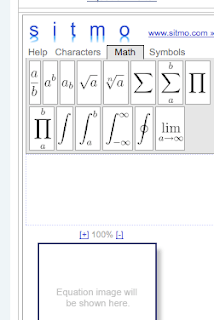 The equation box will produce a code (the code is called LaTex). If you press the fraction button you get \frac{a}{b} in the code window. Whatever you type in the place of {a} will be your numerator and whatever you type in the place of {b} will be the denominator. So, if I wanted to type the code for the conversion factor of cm to inches I would type \frac{1 in}{2.54cm}.
Now I have the LaTex code. I can copy the code. I can take it to any edit page and click insert plugin in the toolbar for the document.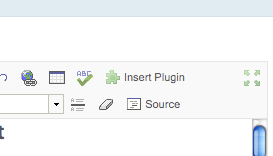
Then scroll your mouse over teaching tools and you will have the option of "equation."
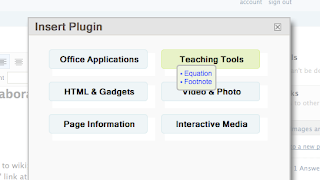
There you can paste your LaTex code and save it to the document. Don't worry, you will get better with this over time and you will not have to paste and copy each time. You will become more familiar with the codes over time.
Another thing that might help...If you click the source button on the edit page you will see all of the codes for the entire page, including LaTex codes. Spend some time there if you really want to understand how web page codes are written. I will also post some cool links on the blog and PBworks if you want to learn more about LaTex. Click the source button again to leave the code page and return to the original document page. I will spend some time with this in class if you still don't understand!
Using the equation editor on the front page of PBWorks, construct your expression.
For example if you want to create a fraction press the fraction button. First button, top left.
 The equation box will produce a code (the code is called LaTex). If you press the fraction button you get \frac{a}{b} in the code window. Whatever you type in the place of {a} will be your numerator and whatever you type in the place of {b} will be the denominator. So, if I wanted to type the code for the conversion factor of cm to inches I would type \frac{1 in}{2.54cm}.
Now I have the LaTex code. I can copy the code. I can take it to any edit page and click insert plugin in the toolbar for the document.

Then scroll your mouse over teaching tools and you will have the option of "equation."

There you can paste your LaTex code and save it to the document. Don't worry, you will get better with this over time and you will not have to paste and copy each time. You will become more familiar with the codes over time.
Another thing that might help...If you click the source button on the edit page you will see all of the codes for the entire page, including LaTex codes. Spend some time there if you really want to understand how web page codes are written. I will also post some cool links on the blog and PBworks if you want to learn more about LaTex. Click the source button again to leave the code page and return to the original document page. I will spend some time with this in class if you still don't understand!
Sunday, August 30, 2009
Units for Measuring Length Posting for Points -PoP
Suppose there were no units for measuring length. Hypothesize how lengths might be described. Then discuss how measuring length would be different without inches. Finally, discuss why having a range of units for measuring length, such as inches and feet, to choose from is necessary. Hypothesize about the possibility of developing a new standard unit for measuring length. Plan the unit. Explain whether the unit would be shorter than 1 inch, between 1 inch and 1 foot, between 1 foot and 1 yard, between 1 yard and 1 mile, or longer than 1 mile. Express the unit in terms of inches, feet, yards, or miles. Debate the advantages of the new unit.
Still Trying to Figure Out How This Works???
I hope it helps...
For you guys who really need help Blogging or Posting or Just doing Whatever around here. Here's some help.
Part 0: Getting On Blogger
For most of us who already made an Account. You already know. For the rest of us... Sigh/// You had to ask... No I asked. Hahaha. We'll first go here. Blogger Home If you didn't sign up. Then sign up. Hahaha. If you already did... Then look for the Sign in Box and sign in with the account you made.
Part 1: Editing Your Profile.
There are two ways to find the link to edit your profile. #1 is at the Dashboard. There's a link that says Edit your profile on the Right Side. #2 is if your viewing your profile. There's a link to edit your profile on the Left Side. Remember you can only edit your profile if your signed in. Duh. Hahaha. Well When you Click on those links you end up in the Edit Profile Page. You can change allot of stuff. Including your screen name for you guys who still need to edit your screen name. Esp. the Pre Cal 20S Guys. Once your done. Look for the Save Profile button and save.
Part 2: Making a Blog.
If you really wanna make a blog. I mean really... Like if your CRAZY ABOUT BLOGGING!!! Go to the Dashboard. Click on Create a blog. Make a title. Make an address. Write the silly little letters. Choose a template and I think your done. Blog made.
Part 3: Posting on a Blog.
Everyone needs help on this one right. Ya I know. A blog by my definition is a series of collective thoughts in your mind that you just wanna get out in the world weather it's funny, sad, happy or mad or something else that doesn't fit on any of those categories. Or. For everyone else out there. Something You do when you got nothing to do. But I like the first Definition better. Don't you. Well... To post on Blogger. Go to The Dashboard. It always starts with the Dashboard. Then go to. New Post. You should automatically be on the create a post page. Then you type a title. YES TITLES are IMPORTANT!!! They Define the Blog. Weather it's a SCRIBE Post or Just a Random thing that you wanna post. Titles are important. Because it makes things allot easier. Now the content. In the Big Rectangle with the white space is where you write your blog. I already stated that it can be funny, sad... I am not gonna go through that again.... Well anyways... After you write whatever. Click on Publish Post. And you don't like what you wrote. Go click on Save as draft. Which means you can still edit the post whenever you like but it will not be shown on the blog. Did I cover everything... Um Ya.
Part 4: Editing a Post.
Now this is fun. Hahaha. Thought I was finished eh? Of course not. Muhahaha. Too bad. Well to Edit a post that you posted. YES YOU cause only you can prevent... I mean. Edit your own posts. Cause Only you can sign in to your blogger account. Does that make sense... Whatever. So you click on Edit Posts. Find your post. And then. Click on Edit. Easy as that. Then you edit your post and click on Publish Post again. But you don't want that post to go back up you can again go to Save as Draft.
Part 5: Deleting a Post.
Quick and Simple. Your Work. Your Post. Only You can Delete your posts. Dashboard... Arg... Ok. Just find edit posts and look for the delete thing and that's that. Ok that was weak.
Part 6: Leaving a comment.
Comments are cool. Of course they are. They provide insight to everything we do on a blog. That's why I try to leave a comment in every post that comes up. They help writers become better writers. Etc. It's really a complicated process. Don't just write Good Job or Cool Post like I've been doing. I'm really getting lazy. Provide comments that leave a Blogger something to think about or improve. They could even edit their post just because of one comment. So remember this. Comment's are good.
Part 7. Yes. Other Stuff...
This stuff is practically random. Or just some stuff to do while editing a post. But it deserves it's own mention. Um. To add an image click on the add image button on the post. To add a link click on the add a link button on the post. To edit your HTML code click on the edit HTML tag. It's really useful for all of your HTML users out there. You can change the colours of your text on the colour text button. Also. You can also chang the size of the text. The Font. Bold, Italic. Did I miss anything? Oh ya. To change where your post is on the blog. Yes this is important. Change the time and date. It really works. Really.
Hey. Person reading my blog. Yes you. Am I missing anything? Well Leave a comment then. Hahaha. Well that's the end of that. If you need extra help. Call my cell. Hahahahahahahaha. Later.
Posted by Richard, a student contributing to his own class's blog from Canada!
For you guys who really need help Blogging or Posting or Just doing Whatever around here. Here's some help.
Part 0: Getting On Blogger
For most of us who already made an Account. You already know. For the rest of us... Sigh/// You had to ask... No I asked. Hahaha. We'll first go here. Blogger Home If you didn't sign up. Then sign up. Hahaha. If you already did... Then look for the Sign in Box and sign in with the account you made.
Part 1: Editing Your Profile.
There are two ways to find the link to edit your profile. #1 is at the Dashboard. There's a link that says Edit your profile on the Right Side. #2 is if your viewing your profile. There's a link to edit your profile on the Left Side. Remember you can only edit your profile if your signed in. Duh. Hahaha. Well When you Click on those links you end up in the Edit Profile Page. You can change allot of stuff. Including your screen name for you guys who still need to edit your screen name. Esp. the Pre Cal 20S Guys. Once your done. Look for the Save Profile button and save.
Part 2: Making a Blog.
If you really wanna make a blog. I mean really... Like if your CRAZY ABOUT BLOGGING!!! Go to the Dashboard. Click on Create a blog. Make a title. Make an address. Write the silly little letters. Choose a template and I think your done. Blog made.
Part 3: Posting on a Blog.
Everyone needs help on this one right. Ya I know. A blog by my definition is a series of collective thoughts in your mind that you just wanna get out in the world weather it's funny, sad, happy or mad or something else that doesn't fit on any of those categories. Or. For everyone else out there. Something You do when you got nothing to do. But I like the first Definition better. Don't you. Well... To post on Blogger. Go to The Dashboard. It always starts with the Dashboard. Then go to. New Post. You should automatically be on the create a post page. Then you type a title. YES TITLES are IMPORTANT!!! They Define the Blog. Weather it's a SCRIBE Post or Just a Random thing that you wanna post. Titles are important. Because it makes things allot easier. Now the content. In the Big Rectangle with the white space is where you write your blog. I already stated that it can be funny, sad... I am not gonna go through that again.... Well anyways... After you write whatever. Click on Publish Post. And you don't like what you wrote. Go click on Save as draft. Which means you can still edit the post whenever you like but it will not be shown on the blog. Did I cover everything... Um Ya.
Part 4: Editing a Post.
Now this is fun. Hahaha. Thought I was finished eh? Of course not. Muhahaha. Too bad. Well to Edit a post that you posted. YES YOU cause only you can prevent... I mean. Edit your own posts. Cause Only you can sign in to your blogger account. Does that make sense... Whatever. So you click on Edit Posts. Find your post. And then. Click on Edit. Easy as that. Then you edit your post and click on Publish Post again. But you don't want that post to go back up you can again go to Save as Draft.
Part 5: Deleting a Post.
Quick and Simple. Your Work. Your Post. Only You can Delete your posts. Dashboard... Arg... Ok. Just find edit posts and look for the delete thing and that's that. Ok that was weak.
Part 6: Leaving a comment.
Comments are cool. Of course they are. They provide insight to everything we do on a blog. That's why I try to leave a comment in every post that comes up. They help writers become better writers. Etc. It's really a complicated process. Don't just write Good Job or Cool Post like I've been doing. I'm really getting lazy. Provide comments that leave a Blogger something to think about or improve. They could even edit their post just because of one comment. So remember this. Comment's are good.
Part 7. Yes. Other Stuff...
This stuff is practically random. Or just some stuff to do while editing a post. But it deserves it's own mention. Um. To add an image click on the add image button on the post. To add a link click on the add a link button on the post. To edit your HTML code click on the edit HTML tag. It's really useful for all of your HTML users out there. You can change the colours of your text on the colour text button. Also. You can also chang the size of the text. The Font. Bold, Italic. Did I miss anything? Oh ya. To change where your post is on the blog. Yes this is important. Change the time and date. It really works. Really.
Hey. Person reading my blog. Yes you. Am I missing anything? Well Leave a comment then. Hahaha. Well that's the end of that. If you need extra help. Call my cell. Hahahahahahahaha. Later.
Posted by Richard, a student contributing to his own class's blog from Canada!
Friday, August 28, 2009
Scribe Post-Monboss-Length
“Not everything that can be counted counts, and not everything that counts can be counted.” ~Albert Einstein
On this wonderful rainy day of August 28, 2009 we chewed upon the idea of a measurement being "exact" or an "estimate." As Camila previously posted about the Geometric Adventure we ventured upon, many of us were given different tools to measure those wonderful depictions of art. We were divided into groups and each of us were received one of these tools to measure our art: a hula-hoop, a camera adapter chord, a 12 inch ruler, and a meter stick. As one might concur, you just can't measure some of the art if one was stuck with measuring tools such as a hula-hoop or camera adapter chord. We concluded the fact that when a measurement is exact you know the indisputable length of something. When a measurement is estimated, you inference on the length of what you are measuring.
For me, when we went through this during class it helped me understand the difference between "exact" and "estimate" because in the beginning of the exercises I thought that all we were doing during class is taking cool pictures. I was frustrated by the idea that it was the third day of school and we hadn't "learned" any math. I would consider myself a conservative when it comes to studying or learning math, I am most comfortable with ole chalk and board. I would be lying if I said that I was thrilled when I heard about how we are going to be Global Learners by using the internet, this was something that was out of my comfort zone. I was irritated by this new method of learning because quite frankly, math is not my most favorite. Although I am still adjusting to this new method of learning, I have learned that the best way to get better at something is to be engaged. Though the whole idea of our math class has been new to me, it has been exciting to learn all about blogging. I have never had a class that strives to engage with every person.
After our back breaking efforts in attempting to produce astronomical examples of Geometric shapes in our day lives, we had the opportunity to vote on the pictures that we best liked. It was a privilege to look into each groups artistic minds and I was honestly impressed by the artistic talent that each group hand. Although my group's geometric art failed to have other eyes look upon it because on a surely unintentional technological mistake by an unnamed member of my group, and it gave me an understanding that my math teachers weren't lying when they said, "Math is everywhere."
Next Scribe: Keenan cuz he the man...
On this wonderful rainy day of August 28, 2009 we chewed upon the idea of a measurement being "exact" or an "estimate." As Camila previously posted about the Geometric Adventure we ventured upon, many of us were given different tools to measure those wonderful depictions of art. We were divided into groups and each of us were received one of these tools to measure our art: a hula-hoop, a camera adapter chord, a 12 inch ruler, and a meter stick. As one might concur, you just can't measure some of the art if one was stuck with measuring tools such as a hula-hoop or camera adapter chord. We concluded the fact that when a measurement is exact you know the indisputable length of something. When a measurement is estimated, you inference on the length of what you are measuring.
For me, when we went through this during class it helped me understand the difference between "exact" and "estimate" because in the beginning of the exercises I thought that all we were doing during class is taking cool pictures. I was frustrated by the idea that it was the third day of school and we hadn't "learned" any math. I would consider myself a conservative when it comes to studying or learning math, I am most comfortable with ole chalk and board. I would be lying if I said that I was thrilled when I heard about how we are going to be Global Learners by using the internet, this was something that was out of my comfort zone. I was irritated by this new method of learning because quite frankly, math is not my most favorite. Although I am still adjusting to this new method of learning, I have learned that the best way to get better at something is to be engaged. Though the whole idea of our math class has been new to me, it has been exciting to learn all about blogging. I have never had a class that strives to engage with every person.
After our back breaking efforts in attempting to produce astronomical examples of Geometric shapes in our day lives, we had the opportunity to vote on the pictures that we best liked. It was a privilege to look into each groups artistic minds and I was honestly impressed by the artistic talent that each group hand. Although my group's geometric art failed to have other eyes look upon it because on a surely unintentional technological mistake by an unnamed member of my group, and it gave me an understanding that my math teachers weren't lying when they said, "Math is everywhere."
Next Scribe: Keenan cuz he the man...
Subscribe to:
Posts (Atom)

 Posts
Posts

